


‘Simplicity is the ultimate sophistication’
Leonardo da Vinci’s supposed quote is nowhere more appropriate than for graphics. If you’ve read many of our other articles, you’ll know we emphasise the importance of making the complex clear through the words we use. This same principle holds true with visualising data. In this article, you’ll learn the most common mistakes when presenting data visually. You’re going to see plenty of good and bad examples, and by the end you’ll know how to create charts, graphics and tables that make a real impact.Does it pass the frown test?
I often find myself frowning when I’m looking at graphics in a report or slide deck. If you hooked up my thoughts to a loudspeaker, you would hear something like:- What’s going on here?
- Where am I supposed to look?
- What are they trying to say?
- What do all these colours mean?
Avoid a data download – find the story
It’s tempting to have your visual include every bit of information it can. More is better, right? Not usually. The result is the reader feels overwhelmed and then disengages. At best, your visual loses impact while the reader struggles to fathom the meaning. Look at this example, where the author has tried to bundle too much information into one chart (and arguably the wrong kind of chart):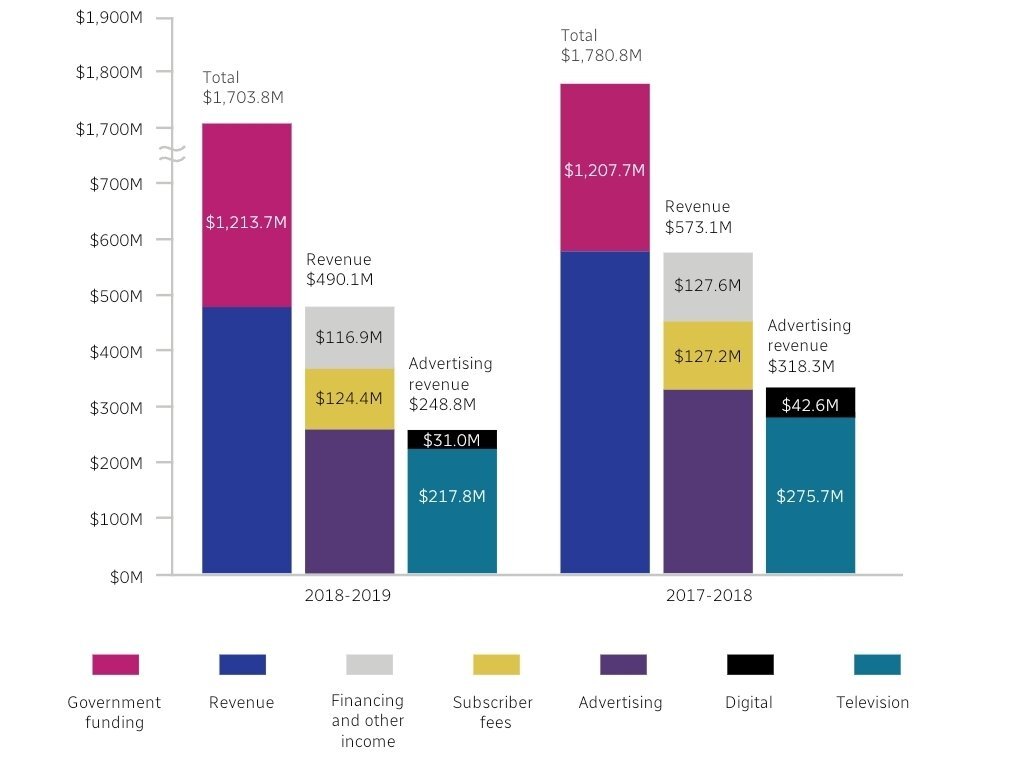
Click image to enlarge. Image source
Open image description
Stacked bar chart illustrating revenue sources for two years (2018–2019 and 2017–2018). The chart’s vertical axis represents monetary values in millions of dollars, ranging from $0M to $1,900M. In fact, this axis is actually divided into units of $100M until it reaches $700M where the scale changes and the divisions become of $1,000M. Vertical bars represent the different revenue streams. 2018–2019: First stacked bar (of three), totalling $1,703.8M: Revenue: A substantial portion in navy/dark blue, approximately $490.1M. Government funding: A significant portion of revenue, shown in maroon, labelled $1,213.7M. Second stacked bar, totalling $490.1M: Advertising: A segment of dark purple, approximately $248.8M. Subscriber fees: A segment of gold, labelled $124.4M. Financing and other income: A segment in a light grey colour, labelled $116.9M. Third stacked bar, totalling $248.8M: Television: A segment of teal, labelled $217.8M. Digital: A segment of black, labelled $31.0M. 2017–2018: First stacked bar (of three), totalling $1,780.8M: Revenue: A significant portion in dark blue, roughly $573.1M. Government funding: A large segment in maroon, labelled $1,207.7M. Second stacked bar, totalling $573.1M: Advertising: A segment of dark purple, approximately $318.3M. Subscriber fees: A segment of gold, labelled $127.2M. Financing and other income: A segment in light grey, labelled $127.6M. Third stacked bar, totalling $318.3M: Television: A segment of teal, labelled $275.7M. Digital: A segment in black, labelled $42.6M. Legend: The legend at the bottom provides colour-coded keys for each revenue source (government funding, revenue, financing and other income, subscriber fees, advertising, digital and television) for both sets of years. Note: If this description is confusing, it is because the graph it describes is incredibly confusing too.Two critical questions
So before you start working on your visual, ask yourself two key questions:- What are the readers most likely to care about?
- What message do I want them to take away?

Click image to enlarge. Image source
Open image description
A line graph displays inflation and interest rates over time. The vertical axis shows the percentage values for both inflation and interest rates. The horizontal axis shows the years in the timeframe, from 2022 to 2024. A blue line represents inflation, starting at around 2% and showing a significant upward trend in early 2022. Then a peak at just over 10%, and a subsequent decline throughout 2023 and into 2024. A data point where the line ends is labelled 1.7%. The highest point of inflation occurred around 2023. The red line represents interest rates, starting around 0 and showing a gradual increase in steps (stair-step pattern) over the period. The interest rates plateaued around 5% from a certain point throughout the later part of 2023 and into 2024. The graph is labeled ‘Inflation and interest rates’, and includes labels for the ‘Inflation’ and ‘Interest rates’ data series. A source attribution to the ONS, Bank of England (last update 16 Oct 2024) is at the bottom.Tell the tale with titles and captions
A very common question I hear is: what’s the difference between a title and a caption? The best approach is where the title describes the contents of a graphic, for example: ‘Figure 1: Sales figures 2023–2024.’ The caption should tell the story of the graphic and draw out an insight or implication for the reader, such as: ‘Our new marketing strategy has boosted sales by 20% this year.’ The example below from Sky News shows this difference well.
Click image to enlarge. Image source
Open image description
A graphic displays global surface air temperatures in 2023, compared with the 1991-2020 average. A world map, centred in the graphic, is coloured to represent temperature anomalies. Warmer-than-average temperatures are shaded in shades of orange and red, while cooler-than-average temperatures are represented by shades of blue and purple. A colour key at the bottom of the graphic indicates the temperature anomaly. The scale ranges from -6°C (significantly cooler than average) to +6°C (significantly warmer than average) in increments of 1°C or less. The title of the graphic reads ‘SURFACE AIR TEMPERATURES COMPARED WITH 1991-2020 AVERAGE’. The source of the data is given as ‘ERA5/Copernicus’. A caption below the map states, ‘Surface air temperatures in 2023 were much warmer than the recent average across huge parts of the world.’Make sure your message matches
Now let’s look at something a bit more complex. There are more elements involved, but it just about works.
Click image to enlarge. Image source: McKinsey
Open image description
Battery cost trends over time, from 2010 to 2030. A graph displays the declining cost of battery packs (in USD/kWh) over time. A line graph shows the historical cost trend and projected future cost trend. The overall trend shows a decrease in battery prices expected to continue into the future. The area showing the historical trend is a deep teal, sloping downward. The 2010 outlook is a lighter teal area. A dashed, light green line also shows a projected trend. A box at the top of the graph details estimates in different years for different companies for 2020 and 2025. The vertical axis represents the USD/kWh of battery packs. The horizontal axis represents the year, from 2010 to 2030. Within the box, there is a list of companies (Bloomberg, NAVIGANT, BYD, LG Chem, Tesla, Panasonic) whose respective projected costs are presented by the name of each company. The estimated prices for each company differ slightly. The title of the graph is ‘And Battery costs continue to fall, faster than expected.’ The source is noted as Expert interview, SNE research, Navigate, Avicenne Energy, Berstein. The legend at the top shows the data source, unit of measurement, and different cost projections for 2010 outlook, 2015/2018 outlook, McKinsey base case, and McKinsey breakthrough.- Battery costs continue to fall.
- That fall is faster than expected.

Click image to enlarge. Image source
Open image description
Line graph showing the changing probability of Arsenal and Manchester City winning the football championship throughout 2023. The graph is presented on a gridded background. The x-axis represents months (August to May). The y-axis displays percentages (from 0 to 100, in increments of ten). Two lines are shown: Light blue line: Represents Manchester City’s probability of winning. It remains around a consistent, moderate probability throughout the months before April. The line rises as Arsenal’s drops, peaking in the late winter/early spring months to eventually win the title. Red line: Represents Arsenal’s probability of winning. The line starts relatively low, increases through the autumn months, hits a peak in January, and then declines into February. After rising a little into March, it drops significantly in the spring, indicating a decline in their chances of winning the title. A few key events are suggested by the graph’s upward or downward trends. And the legend at the bottom mentions the significant period in April 2023 where three successive draws affected Arsenal’s momentum and chances of becoming champions. The graph is titled ‘How did it all unfold last year?’ and includes logos for Arsenal and Manchester City. The source is the BBC.Choose the right chart
Once you’ve worked out your key message(s), you’re in a good position to work out the best kind of chart to show supporting detail. There are loads of options and variations available – here are the most common ones:- bar charts
- pie charts
- line graphs
- tables.
Bar charts
Bar charts are great for comparing categories. In our training, we use a bar chart to show learners how they can improve their writing. Our analysis compares different elements of writing to show each learner where they need to focus so they can improve. Here’s an example:
Click image to enlarge.
Open image description
Bar graph displaying the frequency of non-use/errors per 1,000 words in various writing skills. The x-axis represents the number of non-use/errors per 1,000 words, ranging from 0 to 12. The y-axis represents the writing skills: from the top, ‘People/Direct’, ‘Active voice’, ‘Keeping it short and simple’, ‘Being specific’, ‘Sentence structure’, ‘Punctuation’, ‘Grammar’, ‘ Proofreading’, ‘Design’, ‘Spell-check’, ‘Paragraph structure’, ‘Document structure’, ‘Introductions’, ‘Endings’ and ‘Summaries’. Each skill is represented by a horizontal bar whose length corresponds to the frequency of non-use/errors. Skills with higher frequencies of errors have longer bars, extending further to the right on the x-axis. The skills with the highest error rates are ‘Punctuation’ and ‘Document structure’. ‘People/Direct’, ‘Active voice’, and ‘Keeping it short and simple’ are among the lowest.Horizontal bar charts
Bar charts come in a few different types. Some have the bars positioned horizontally, like our writing analysis chart above. And here’s another good horizontal bar chart. In this example, it makes sense to start with the travel method with the biggest carbon footprint, as that’s the title and focus of the graphic.
Click image to enlarge. Image source
Open image description
A light-blue infographic displays the carbon footprint of various major travel methods. The horizontal bars, representing different transport types are labelled with values (grams of CO2e per passenger over 1km). The infographic highlights the numerical values for the carbon footprint of different transportation types: >250 for Cruise ship, 246 for Short-haul flight, 171 for Diesel car, 170 for Gas car, 151 for Medium-haul flight, 147 for Long-haul flight, 113 for Motorbike, 96 for bus, 68 for Plug-in hybrid, 47 for Electric car, 35 for National rail, 28 for Tram, 27 for London Underground, 19 for Ferry and 4.5 for Eurostar train. The bars also includes images depicting the various vehicles, providing visual context to the transport methods. The title states ‘The Carbon Footprint of Major Travel Methods’. There is a note below it stating, ‘Emissions will vary depending on energy mix, transport technology, and occupancy.’ A footer contains a source attribution to Our World in Data, UK Government, Department for Energy Security and Net Zero. A small logo or brand name (‘voronoi’) is located at the bottom left corner, accompanied by the text ‘Where Data Tells the Story.’
Click image to enlarge. Image source
Open image description
Two versions of a bar chart displaying smoking status and frequency data. The left chart is a vertical bar chart. The x-axis represents different smoking statuses (Non-smoker, Light (1-5), Moderate (6-15), Heavy (16-25), Very Heavy (>25)). The status labels are written on the diagonal. The y-axis represents frequency, ranging from 0 to 2,500. The bars show the number of individuals in each respective smoking category. The Non-smoker category has the highest frequency, followed by Heavy (16-25). The right chart is a horizontal bar chart displaying the same data but switching it around. It uses the same smoking status categories but now on the y-axis, with frequency now on the x-axis. The bars are displayed horizontally, with length corresponding to the frequency values.Vertical bar charts (sometimes called column charts)
Like its horizontal cousin, a vertical bar chart compares categories. You might choose a column chart when you want to show categories over time, to show a simple trend or pattern.
Click image to enlarge. Image source
Open image description
Bar graph visualising monthly inflation rates in Argentina for the year 2002. The x-axis represents the months of the year (January to December). The y-axis represents the percentage of inflation for each month. The bars are coloured light blue and sized according to the inflation rate for each month. The tallest bar corresponds to April, with a 10.1% inflation rate. The smallest bars are in December (0.2%), November (0.5%), and October (0.8%). The inflation rates are labeled above each bar. Light-grey horizontal lines positioned at 2% increments help with reading the percentages off the graph.Clustered bar charts
Sometimes you might need to compare subcategories against each other. In this scenario, you might opt for a clustered vertical or horizontal bar chart.
Click image to enlarge. Image source
Open image description
A slide showing clustered bar graphs illustrating the time it takes for business functions to utilise generative AI capabilities after project launch. The x-axis represents different business functions: Marketing and sales, Strategy and corporate finance, Risk, Human resources, and Product and/or service development. The y-axis displays the percentage of respondents who put the generative AI capabilities to use within a particular timeframe. The categories on the y-axis (legend) are: <1 month, 1–4 months, 5–8 months, and >8 months. The bars in each cluster are colour-coded based on the timeframes, with light teal for <1 month, a slightly darker teal for 1–4 months, dark teal/blue for 5–8 months, and navy blue for >8 months. The percentage for each timeframe in each business function appears at the top of each bar segment. For example, the Marketing and sales function shows approximately 27% using the generative AI capabilities within 1-4 months. There is a title to the slide: ‘Business functions are most often able to put their generative AI capabilities to use within one to four months’.Stacked bar charts
Stacked bar charts can work if you need to compare subcategories as well as the category total amounts, or to compare percentages within different categories. Just try not to make the chart too busy. Take a look at the example below (click it to view a larger version):
Click image to enlarge. Image source
Open image description
A horizontal stacked bar chart with the title ‘Reasons for uncertainty about COVID-19 vaccines as reported by adults worldwide in September 2021, by country’. The chart is segmented vertically by country (Australia, Brazil, Canada, France, Germany, Italy, Japan, Russia, South Korea, Spain, UK, USA) and horizontally by the reasons for uncertainty. Each country’s bar is divided into different-coloured segments representing the percentage of adults who cited each reason for their uncertainty. The reasons and the colour legend are at the bottom. The reasons include: * Concerned about side effects * Against vaccines more generally * Don’t trust the companies making the vaccine * Worried the clinical trials moved too fast * Don’t think the vaccine will be effective * The risk of getting COVID-19 is small * Other The percentages are represented visually by the sizes of the segments within each country’s bar, allowing for a comparison of the most prevalent reasons for vaccine hesitancy across different countries. Numerical values are also provided for each segmented category within the bar.
Click image to enlarge. Image source
Open image description
A horizontal stacked bar graph titled ‘4.1 UK imports of goods and services over time.’ The graph displays UK imports of goods and services in billions of pounds sterling (£) from 2016 to 2023. Each year is represented by a bar that is divided up into two: one representing ‘Goods (£ billion)’ in dark teal/navy blue, and the other representing ‘Services (£ billion)’ in a light teal/seafoam green. The legend representing the colour code is at the top. The values for each category are labeled on the corresponding bars. A button at the top of the image reads ‘Change to table and accessible view’.Pie charts
Most of us are familiar with the good old pie chart. Pie charts are great for showing proportions or weightings. There are three things to remember:- Don’t include too many items (if possible, a maximum of five), as it can be hard for the reader to decipher very small pieces of pie.
- Make sure the individual segments add up to 100%.
- Avoid 3D wedges or anything that brings unnecessary complexity.

Click image to enlarge. Image source
Open image description
Two pie charts with the title ‘Employment by major sectors in Latvia, 2007’, one chart labelled ‘women’ and one ‘men’. The pie chart for women shows the following distribution: Services: 77% Industry: 16% Agriculture: 7% The pie chart for men shows the following distribution: Services: 47% Industry: 40% Agriculture: 12% A caption below the charts identifies the source as the UNECE Statistical Database.Doughnut charts
The main variation of a pie chart is a doughnut chart. It’s the same as a pie chart, except it’s got a hole in the centre (like a ring doughnut) in case you want to put extra data or information in the middle. Here’s a good example:
Click image to enlarge. Image source
Open image description
A doughnut pie chart with the title ‘Share of chemical elements in humans’ split into labelled sections. The largest segment, a deep teal colour, represents Oxygen (61%). The second largest segment, a slightly lighter teal colour, represents Carbon (23%). Smaller segments, in a light greenish-grey, represent Hydrogen (10%), Nitrogen (2.6%), and ‘Other’ elements (3.2%). Text in the centre of the pie chart states, ‘Humans consist of 84% Oxygen and Carbon.’ Small text at the bottom left of the image, states ‘Source: periodictable.com. Get the data’.
Click image to enlarge. Image source
Open image description
A pie chart titled ‘THE WORLD CUP’S BIG GUNS’ displays the percentage of a team’s runs scored by their top scorer in a cricket match. The chart is divided into segments, each representing a different player and their respective percentage contribution. The segments are colour-coded and labeled with the player’s name and the percentage value. The percentages are shown next to the player’s names (eg, ‘WILLIAMSON 30.23’). The players represented in the chart are Williamson (30.23), Rahmat Shah (14.8), Kusal Perera (18.16), Root (19.07), Pooran (20.01), Du Plessis (21.06), Babar (24.51), Warner (25.02), Rohit (29.05), and Shakib (28.25). Each segment’s size reflects its numerical value. The source, ‘ESPN cricinfo’ appears at the bottom of the image.Line graphs
I love the simplicity of line graphs. They’re ideal for showing trends or sudden spikes or deviations in a trend. (The Economist does these brilliantly.) They’re also handy for showing the comparative trends of related items. Here’s one from the British Council:
Click image to enlarge. Image source
Open image description
Line graph with title ‘Percentage of total music sales by method’ A legend on the right lists Streams, Downloads and CDs purchased. The y-axis represents the percentage of total music sales, ranging from 0 to 60. The x-axis represents the year, from 2011 to 2018. Streams: Show a clear upward trend, starting at a low percentage in 2011 and increasing steadily through the years. Downloads: The percentage of music sales from downloads is highest in 2013, around 40%, and then gradually decreases over the following few years. CDs purchased: The percentage of music sales from CDs purchased is highest in 2011, around 55%, and then gradually decreases through the years. The graph visually displays the changing market share of these different music sales methods over time. Note that the percentage of sales from all three methods combined nearly equals 100% during this time frame, with small differences in between.Area (or filled) line graphs
Area line graphs are good for showing changes in trend in a quantity of something. The filled-in space can give a better visual representation of an amount. A nice example of this is from this Financial Times graph about exports and China’s economy.
Click image to enlarge. Image source
Open image description
Filled line graph showing China’s exports as a percentage of its GDP over time, from 1960 to 2020. The title is ‘China’s economy has become less reliant on exports in recent years’. The horizontal axis represents the years, ranging from 1960 to 2020 in increments of five. The vertical axis represents the percentage of exports as a share of China’s GDP, ranging from 0% to 40%. The graph displays a fluctuating trend. From approximately 1960 to 1980, exports as a percentage of GDP remain relatively low, hovering around 5% to 10%. There is some fluctuation, but the overall trend is low. From the mid-1980s, the percentage increases steadily, with peaks increasing in the 1990s and 2000s. The graph reaches its highest point in the mid-2000s – reaching over 35%. After this point, the percentage decreases gradually until it levels out slightly above 15% towards 2020. A shaded area is under the line graph, indicating the variability of exports during those years.Stacked line graphs
Sometimes area line graphs can also be stacked. This is useful if you want to show changes in quantities of different categories over time. The Guardian has interesting example, below:
Click image to enlarge. Image source
Open image description
A stacked area chart displays the projected world population growth from 1950 to 2100, broken down by continent. The chart is coloured in different shades, each representing a different continent/region. From bottom to top, the colours are: red (Asia), dark orange/red-orange (Africa), light orange/yellow (Latin America and Caribbean), teal/dark blue (Europe), light blue (North America), and light purple (Oceania). The vertical axis shows the population in billions (from 0 to 10). The horizontal axis represents the years from 1950 to 2100. A dark arrow points downwards from the text ‘7.9 billion people in 2020’, indicating the population in that year. Colour-coded figures placed next to the category sections on the right-hand side list the population projections for each region in 2100. These are: Africa (4.28 billion), Asia (4.72 billion), Oceania (75 million), North America (491 million), Europe (630 million), and Latin America and Caribbean (680 million). The chart clearly illustrates the projected growth of the world population over the next century, highlighting that Africa will be the major driver of this growth. The title reinforces this: ‘The world’s population will rise to 10.9bn by 2100, with most of the growth driven by Africa.’Tables
Unloved and underused, the humble table can add gravitas to a report or slide deck. It could be your best option if your readers need to compare numbers in detail or you want to include precise figures for reference. But, as with all visual data, tables can be done very badly. Here are a few tips to keep your tables in good shape:- Put your most important column next to the data labels on the left.
- Remove or grey back some of the vertical gridlines in simple tables (you don’t want the gridlines competing with the text).
- Round up numbers, if possible, to avoid long decimals.

Click image to enlarge. Image source
Open image description
A portion of a table with the title ‘Economic data’ (also labeled ‘1 of 2’) showing Gross Domestic Product data. It presents percentage change data of Gross Domestic Product for various countries (United States, China, Japan, Britain and Canada). The table is organised with a column for the country and three more columns for the data, with an overarching label of ‘Gross domestic product’. The three columns are labelled ‘% change on a year ago’ ‘latest’, ‘quarter’ and ‘2024’. Columns represent: Latest: Percentage change in the Gross Domestic Product between the latest quarter (indicated here as Q2) and the same quarter in the previous year (eg 3.0% for the United States and -1.0% for Japan). Quarter: This compares the latest quarter (here, Q2) with the previous quarter (eg 3.0% for the United States) 2024: This is a forecast figure for the whole of 2024 (eg 2.4% for the United States). The table shows the first column (‘latest’) highlighted in grey, but with a colour distinction given to the Japan’s latest quarter figure of -1.0%, indicating negative growth.
Click image to enlarge. Image source
Open image description
Premier League Table. A table displays the current standings of various teams in the Premier League. The columns include: Position: The rank of each team. Team: The name of the team. Played: The number of matches played by the team. Won: Number of matches won by the team. Drawn: Number of matches drawn by the team. Lost: Number of matches lost by the team. For: Goals scored by the team. Against: Goals conceded by the team. GD: Goal difference (For – Against). Points: Total points accumulated by the team. These figures are larger than those in other columns. Form: Recent results of the team (D=Draw, W=Win, L=Loss). The horizontal gridlines are light grey and there are no vertical gridlines. Each team’s record includes the total matches played, wins, losses, draws, goals scored, goals conceded, goal difference and total points earned. The last column, ‘Form’, shows a series of abbreviations indicating the team’s recent matches. Finally, the table is topped with the title ‘Premier League Table’ and a search bar above it.Where do you want them to look?
With a good title, clear key message and the right choice of chart, you’re well on your way to producing a good graphic. But there’s one last thing you can do to make it even better for your readers: direct their eyes to the right place. Every chart should answer the question, ‘Where should I look?’. Your chart might have lots of important detail, but there’s usually one part you really want the reader to notice. This one thing will most likely support the insight or message in your caption. You can direct the reader’s eyes to the relevant part of the data in many ways. The most common ones are:- using colour
- playing with size
- adding shapes.

Click image to enlarge. Adapted from source
Open accessible table
| Online Service | Launch Year | Time Taken to Reach 1 Million Users |
|---|---|---|
| Threads | 2023 | 1 hour |
| ChatGPT | 2022 | 5 days |
| 2010 | 2.5 months | |
| Spotify | 2008 | 5 months |
| Dropbox | 2008 | 7 months |
| 2004 | 10 months |

Click image to enlarge. Image source
Open image description
A chart titled ‘Revenues skyrocket over 3 years after cloud launch’ displays the revenue growth of Hewlett Packard Enterprise over a five-year period (FY10–FY14) before and after the launch of their cloud services. The vertical axis represents revenue in millions of US dollars, ranging from $60 million to $120 million. The horizontal axis represents the time period, broken down into quarters (Q1–Q4) and fiscal years (FY10–FY14). A grey line plots the revenue trend before the cloud launch. This line shows a fluctuating pattern. A teal/turquoise line plots the revenue trend after the cloud launch. This line shows a significant increase, indicating a revenue skyrocket. Noticeable growth occurs starting at the point where the ‘Cloud launch’ indicator is plotted on the chart (around Q1 FY12). A label ‘Cloud launch’ with an arrow pointing downwards is positioned on the chart, indicating the point at which the cloud services were launched. A label ‘+68% growth’ highlights the percentage growth in revenue after the cloud launch.
Click image to enlarge. Image source
Open image description
Horizontal bar chart visualising fertility rates (average number of births per woman in her lifetime) across different regions globally, for the years 2015–2020. The chart’s x-axis represents the average number of births per woman, ranging from 0 to 5. The y-axis displays the regions; from top to bottom: Sub-Saharan Africa, Africa, Western Asia, Oceana, Central south-eastern Asia, Asia, Latin America/Caribbean, East/south-east Asia, North America and Europe. Regions are represented by dark blue bars, except for the ‘Africa’ bar, which is light blue. The ‘Africa’ label is in bold text. The length of each bar corresponds to the fertility rate of that region, indicating that births in Africa are significantly higher than the global average. The data suggests that Sub-Saharan Africa has the highest fertility rate among the listed regions. The chart also shows fertility rates across other regions, demonstrating a wide variation globally. The world average is also shown in the chart as a dotted vertical line labelled ‘World’. The chart is titled ‘Births in Africa are far higher than world average’.Accessibility – making data inclusive
As we’ve seen above, colour can be a nice way of emphasising certain things in a graphic. But do remember some colours can pose problems for readers with visual impairments. People with colour blindness, for example, find it difficult distinguishing between particular colours. Try to avoid only representing meaning through colour use – use labels as well. With the colours you do use, having a strong contrast between them can help. Brandeis University in the US illustrates this issue well with two pie charts:
Click image to enlarge. Image source
Open image description
Pie chart titled ‘Salary distribution across departments’. The largest slice, representing the accounting department at 32%, is coloured a light pinkish-purple. The next largest slice, representing the sales department at 28%, is a light greyish-purple. Two smaller slices, each representing 15%, are present – one each for the operations and research departments. One is a light teal-blue and the other a medium grey-blue. There is a legend indicating what department each colour represents on the right-hand side. The department-name labels and percentages appear only in the legend, not on the pie chart itself. The whole chart is labelled ‘Inaccessible’.
Click image to enlarge. Image source
Open image description
Another version of the pie chart illustrating salary distribution across departments, with the same title. The chart is divided into four different coloured segments, each representing a different department. There are black lines dividing the sections (unlike in the example before). The department names and percentages are clearly labeled inside each segment of the pie chart. A title clearly states ‘Salary distribution across departments’. Accounting: 32% of the total salary distribution. This is the largest segment, depicted in a light pinkish-purple colour. Sales: 28% of the total salary distribution. This segment is a muted lavender-grey colour. Operations: 15% of the total salary distribution. This segment is a light teal/blueish-green colour. Research: 15% of the total salary distribution. This segment is a light greyish-blue colour. The whole chart is labelled ‘Accessible’.A simple checklist for high-impact charts
In closing, let’s summarise what we’ve covered using the following checklist. Consider these things next time you need to include a chart in your work. Have you:- thought about what your readers might be most interested in knowing?
- formulated a clear take-home message for the reader that tells the story of the data?
- reflected that message as a caption (in a report) or in the slide’s title?
- chosen the right type of chart to show supporting detail –
- horizontal bar charts (for comparing categories)
- vertical bar charts (for comparing categories across time)
- pie charts (for showing proportions)
- line graphs (for showing trends)
- tables (for comparing detailed numbers)?
- used colours, size or shapes to direct the reader’s eyes to the part of the graphic that’s most important?
- considered accessibility issues and whether you need to provide alt text?
- checked that your chart is easy to grasp and doesn’t cause brain strain?
Image credit: metamorworks / Shutterstock
Topics
Subscribe
Expert advice to your inbox
